

Search engines like Google and Bing rely heavily on XML sitemaps to understand how your website is structured. Whether you’re running a blog, business website, eCommerce store, or portfolio, creating a sitemap plays a vital role in boosting your online visibility and improving your indexing speed.
In this guide, we’ll walk you through how to create sitemap XML, how to use a sitemap generator, how to find a website’s sitemap, and how to submit your website to Google for faster indexing — everything you need to improve SEO and user experience.
Table of Contents
What is an XML Sitemap?
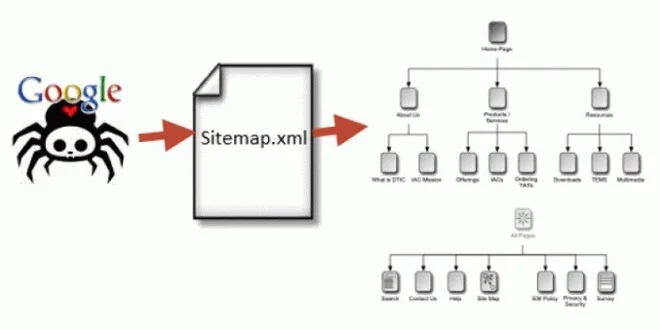
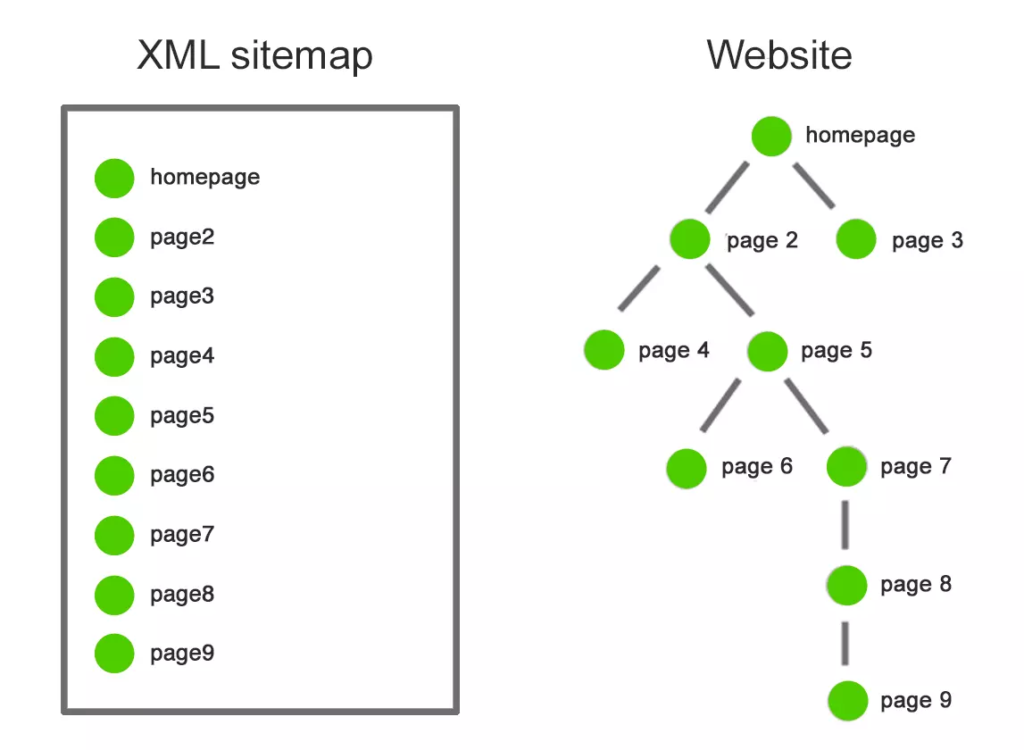
An XML sitemap is a machine-readable file that helps search engines discover and crawl all important pages of your website. It acts like a “roadmap” that guides Google to every part of your website.
A typical XML sitemap looks like this:
<?xml version="1.0" encoding="UTF-8"?>
<urlset xmlns="http://www.sitemaps.org/schemas/sitemap/0.9">
  <url>
    <loc>https://yourwebsite.com/</loc>
    <lastmod>2025-01-10</lastmod>
    <priority>1.00</priority>
  </url>
</urlset>
This is why businesses must create XML sitemap as part of every SEO campaign.
Why Creating an XML Sitemap Is Important
- Ensures faster indexing
- Helps Google discover new content
- Improves SEO & visibility
- Avoids crawl issues
- Boosts rankings for commercial pages
- Helps search engines understand website structure
For commercial websites, a well-structured sitemap supports SEO landing pages, service pages, and product listings.
How to Create a Sitemap XML (Step-by-Step Guide)
There are three major ways to create a sitemap:
1️⃣ Use a Sitemap Generator (Fastest Method)
Using an automatic tool is the easiest way to generate a professional XML sitemap.
Best Online Sitemap Generators:
- XML-Sitemaps.com
- SEOptimer Sitemap Generator
- Screaming Frog SEO Spider
- Yoast XML Generator
Steps:
- Open a sitemap generator website
- Enter your domain (example: https://yourwebsite.com)
- Click Start / Generate Sitemap
- Download sitemap.xml
- Upload it to your root directory (
public_html/)
This method is ideal for:
✔ Static HTML websites
✔ Custom-coded websites
✔ Small business websites
2️⃣ Create XML Sitemap in WordPress (Recommended for Beginners)
WordPress users can generate a sitemap automatically using SEO plugins.
✔ Recommended Plugins:
- Rank Math SEO
- Yoast SEO
- AIOSEO (All-in-One SEO)
Steps:
- Install Rank Math or Yoast
- Go to Sitemap Settings
- Turn ON XML Sitemap
- Visit your sitemap URL:
https://yourwebsite.com/sitemap.xml https://yourwebsite.com/sitemap_index.xml
The plugin automatically updates your sitemap when you publish new content — perfect for commercial websites that upload regular service pages or blogs.
3️⃣ Create a Sitemap Manually (For Developers / Custom Websites)
If you want full control over URLs, structure, and priority, you can manually create a sitemap.
Steps:
- Open Notepad or VS Code
- Add your URLs in XML format
- Save the file as sitemap.xml
- Upload it to the root folder of your website
This method is best for:
- Corporate commercial websites
- SaaS landing pages
- Custom frameworks like Laravel, Django, React, Node.js
How to Find a Website’s Sitemap
Sometimes you may want to check competitors’ sitemaps for insights.
Try accessing common URLs:
https://website.com/sitemap.xml
https://website.com/sitemap_index.xml
https://website.com/sitemap1.xml
https://website.com/wp-sitemap.xml
If not found, use tools like:
- Ahrefs Webmaster Tools
- Screaming Frog
- Google Search Operator:
site:website.com filetype:xml
This helps in competitive analysis for keyword mapping and content strategy.
How to Submit Website to Google (Must-Do for SEO)
Submitting your sitemap to Google Search Console accelerates indexing.
Step-by-Step: Submit Sitemap to Google
- Go to Google Search Console
https://search.google.com/search-console - Add your website (Property)
- Verify domain ownership
- Go to Sitemaps (left menu)
- Enter sitemap URL:
sitemap.xml sitemap_index.xml - Click Submit
Within a few hours to days, Google starts indexing your website.
Commercial Importance: Why Every Business Should Create XML Sitemap
For business websites, commercial intent is extremely strong because:
✔ New pages get indexed faster
✔ Product pages become visible in search results
✔ Improves service-page ranking (SEO boost)
✔ Helps Google understand your business offerings
✔ Boosts local SEO + GMB visibility
✔ Helps large eCommerce websites with structured indexing
Creating a sitemap is not just a technical step — it’s a critical business decision that directly impacts your online revenue.
Common Mistakes to Avoid
- Do not add URLs with 404 errors
- Do not include noindex pages
- Do not add URLs blocked by robots.txt
- Don’t include duplicate content
- Ensure sitemap size is below 50,000 URLs
- Always use HTTPS over HTTP
Conclusion
Creating an XML sitemap is one of the simplest yet most powerful SEO actions you can take. Whether you use a sitemap generator, a WordPress plugin, or build it manually, a sitemap ensures that search engines crawl your website efficiently.
By following this guide, you now understand:
✔ How to create sitemap XML
✔ How to use a sitemap generator
✔ How to create a sitemap manually & in WordPress
✔ How to find a website’s sitemap
✔ How to submit your website to Google
✔ Why businesses need XML sitemaps for SEO & revenue
A proper sitemap is not just technical — it’s a commercial SEO asset that directly improves visibility, authority, traffic, and conversions.
FAQs
1. What is an XML sitemap and why is it important for SEO?
An XML sitemap is a structured file that lists all important pages of your website so search engines like Google can crawl and index them easily. It improves your SEO by helping Google discover new pages faster, understand your site structure, and avoid crawl errors.
2. How do I create a sitemap XML for my website?
You can create a sitemap using:
- Sitemap generators (XML-Sitemaps, Screaming Frog)
- WordPress plugins (Rank Math, Yoast, AIOSEO)
- Manual XML file creation
After creating the file, upload it to your website’s root directory or automatically generate it through plugins.
3. How do I submit my sitemap to Google?
Go to Google Search Console → Sitemaps, enter your sitemap URL (e.g., sitemap.xml), and click Submit. Google will start indexing your website and display crawl status inside GSC.
4. How can I find a website’s sitemap?
Most websites store their sitemap in common locations like:
/sitemap.xml
/sitemap_index.xml
/wp-sitemap.xml
You can also use tools like Screaming Frog or search on Google using:site:example.com filetype:xml
5. What should I include or avoid in my XML sitemap?
You should include only important, indexable pages—home, services, products, categories, and blogs. Avoid adding:
- 404 URLs
- Duplicate pages
- Noindex pages
- Admin or login pages
- Test or staging URLs